Marketplace / Claude Bridge
Premiere Pro plugin · Free · Version 1.1.0
Claude Bridge
A Premiere Pro panel that lets Claude import sequences from other projects, bring in media and XML by path, create and open projects, and read what’s in them.
Zip, 174 KB. Includes the panel, installer, uninstaller and the guide.
SHA-256 0bc4ff8d75613e74dbe5b32c9738420502487d316029102c67fb078f2e224687
What you need
- A Mac
- Windows isn’t supported yet.
- Adobe Premiere Pro
- 2023 or later. Tested on version 26.3.
- Claude Code
- In Terminal, or in the Claude desktop app’s Code tab.
- Python 3
- Included with Apple’s Command Line Tools. The installer offers to set it up.
Install
- Download and unzip. Double-click the zip. You’ll get a folder called Claude Bridge 1.1.0.
- Run the installer. Right-click
Install Claude Bridge.commandand choose Open. macOS asks you to confirm the first time because it isn’t from the App Store; click Open again. - Restart Premiere Pro. Premiere only looks for new panels when it starts.
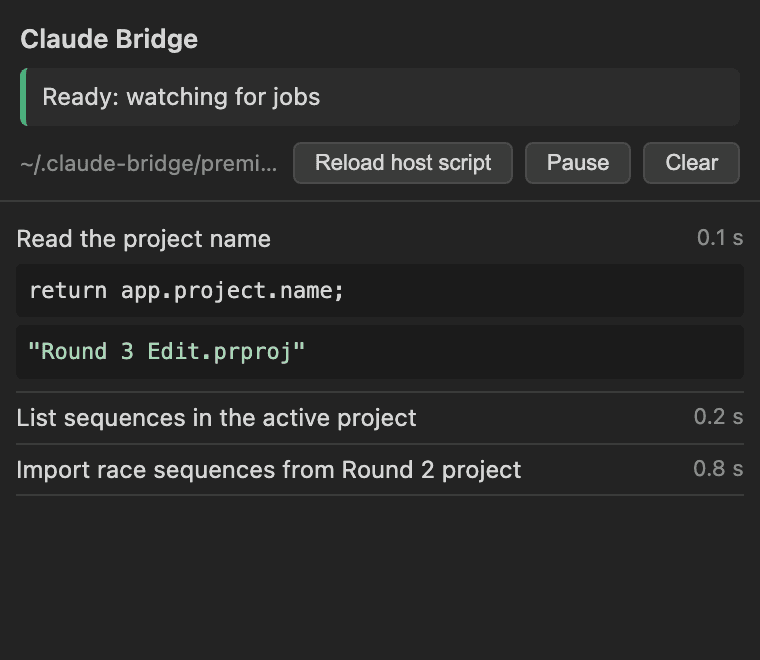
- Open the panel. Choose Window › Extensions › Claude Bridge, and drag it into its own frame so it’s never hidden behind another tab. It should say “Ready: watching for jobs”.
- Check it. In Terminal, run
~/.claude-bridge/bin/premiere doctor. It either reports everything healthy or lists exactly what to fix.
The installer copies the panel into Adobe’s extensions folder, turns on Adobe’s setting for panels that aren’t from its marketplace (PlayerDebugMode), and adds the premiere command that Claude uses. Nothing else is changed. If macOS blocks it, open System Settings › Privacy & Security and click Open Anyway.
Set up Claude
- Give Claude the instructions. The download includes
For Claude.md. Paste it into theCLAUDE.mdfile in the folder you work in with Claude Code, or ask Claude to read it at the start of a session. - Allow the command. The first time Claude runs
premiere, Claude Code asks your permission. - Try a first job. With Premiere open and the panel ready, ask:Use Claude Bridge to check Premiere is ready, then list the sequences in my open project.
Things to ask for
- Import every sequence from “Round 2 Edit.prproj” into the project I have open, and put them in a bin called Round 2.
- Import the drone folder on my Footage drive into a bin called Aerials.
- Create a new project called Client Review in my Projects folder and import this XML into it.
- Which bins in this project have the most sequences? Don’t change anything.
Rules for reliable jobs
- Keep the panel visible, in its own frame. A hidden panel won’t take jobs.
- Close any dialog in Premiere (Export, Save As, Link Media) before Claude runs a job.
- Run
premiere doctorbefore a big session. - Jobs stop after two minutes. Ask Claude to allow longer for big imports.
- If a job times out, restart Premiere. Nothing else clears it.
If something’s wrong
- Ready: watching for jobs
- Healthy. Nothing to do.
- Hidden: this tab is behind another panel
- Bring the tab to the front, or give it its own frame.
- ExtendScript not loaded
- Click Reload host script.
- Premiere’s script engine did not answer…
- A job timed out. Restart Premiere.
- Superseded by a newer Claude Bridge panel
- Two copies are open. Close this one.
The PDF guide covers every panel message, error code and command. To uninstall, run Uninstall Claude Bridge.command from the download and restart Premiere.
Privacy and safety
- Nothing is sent over the internet, and the panel opens no network ports.
- Jobs pass through a folder only your Mac user account can access.
- Every job is shown in the panel, with its script and result.
- Jobs have a time limit and an expiry, and are never re-run by surprise.
Claude can run any Premiere script through the panel, including ones that change or save a project. Keep backups of important projects, and ask Claude to explain a change before it makes it.
Support
Free, and provided as is. For bugs and questions, get in touch and include the output of premiere doctor.
Claude is a product of Anthropic. Claude Bridge is an independent tool and isn’t made or endorsed by Anthropic or Adobe. Adobe and Premiere Pro are trademarks of Adobe.